

Teams & Users
Feature video
Who is this for?
- Administrators who manage account organization.
- Managers who oversee the scope of their team.
Permissions and licenses
- Managing users is reserved for administrators authorized to manage users, such as the User admin and the Super admin.
- Managing teams is reserved for administrators authorized to manage teams.
- Read rights on roles help verify the access levels granted.
Use cases
- Add or remove a user.
- Change some of their settings, such as their language or role.
- Create a team.
- Assign specific summaries to each team.
- Set custom access rules for each group.
How to use it
Create or edit a team
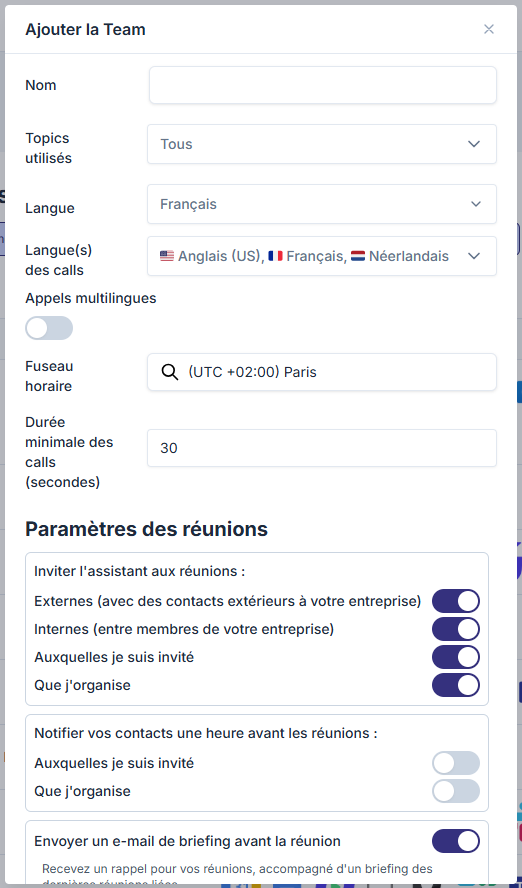
From Settings > Company > Teams & Users, click Add Team, or the edit icon of an existing team. Fill in the team profile, unfold Settings if you want to adjust its meeting rules, then confirm.
Options and impact of each setting: see References › Settings › Teams & Users.
Invite a user
Two entry points open the same form: the Add User button on Settings > Team > My team, or the add-user icon of a team on Teams & Users.
Fill in the name, email address, team, role(s) and license. Unfold More options to adjust the language, call languages and time zone, prefilled with the team's values. Click Add: the person receives their invitation by email.
The form contains no recording settings: what the assistant records for this person is set on Meeting rules.
Remove and reactivate a user
To remove a user, use the delete icon on their row. To reactivate a deleted account, go to the bottom of the page in the Deleted operators section and click Reactivate.
Check the useful statuses
Review the role, license, languages and integrations columns to steer the rollout. The search bar and the Export CSV button help in large companies.
Update over time
Reassign a license, change a role, or reactivate a user as the organization evolves.
Going further
- This page is the main entry point for scaling up a Leexi rollout.
- Team settings simplify harmonizing usage at scale.
- The combination of role plus license remains the foundation of your product rights.
Frequently asked questions
Things to watch out for
- A license that's too basic hides certain functions, even if the role is high-level.
- A role that's too broad potentially opens access to sensitive settings.
- Remember to check access rights after any team reorganization.