

Leexi Coach
CRM Autofill
Automatically populate CRM fields from Leexi call content.
Definition: CRM Autofill automatically fills deal, contact, or organization fields based on information detected in calls and AI outputs.
Feature video
No video is available at this time.
Who is this for?
- Teams who want to limit data re-entry in their CRM.
- RevOps or CRM administrators who structure update automation.
Permissions and licenses
- Requires: Leexi Coach
- Requires the Leexi Coach add-on and an active CRM integration.
- Configuration requires CRM field management rights.
- Available workflows also depend on the connected CRM.
How to use it
Connect the CRM
First, activate the CRM connector appropriate for your organization.
Open the Autofill configuration
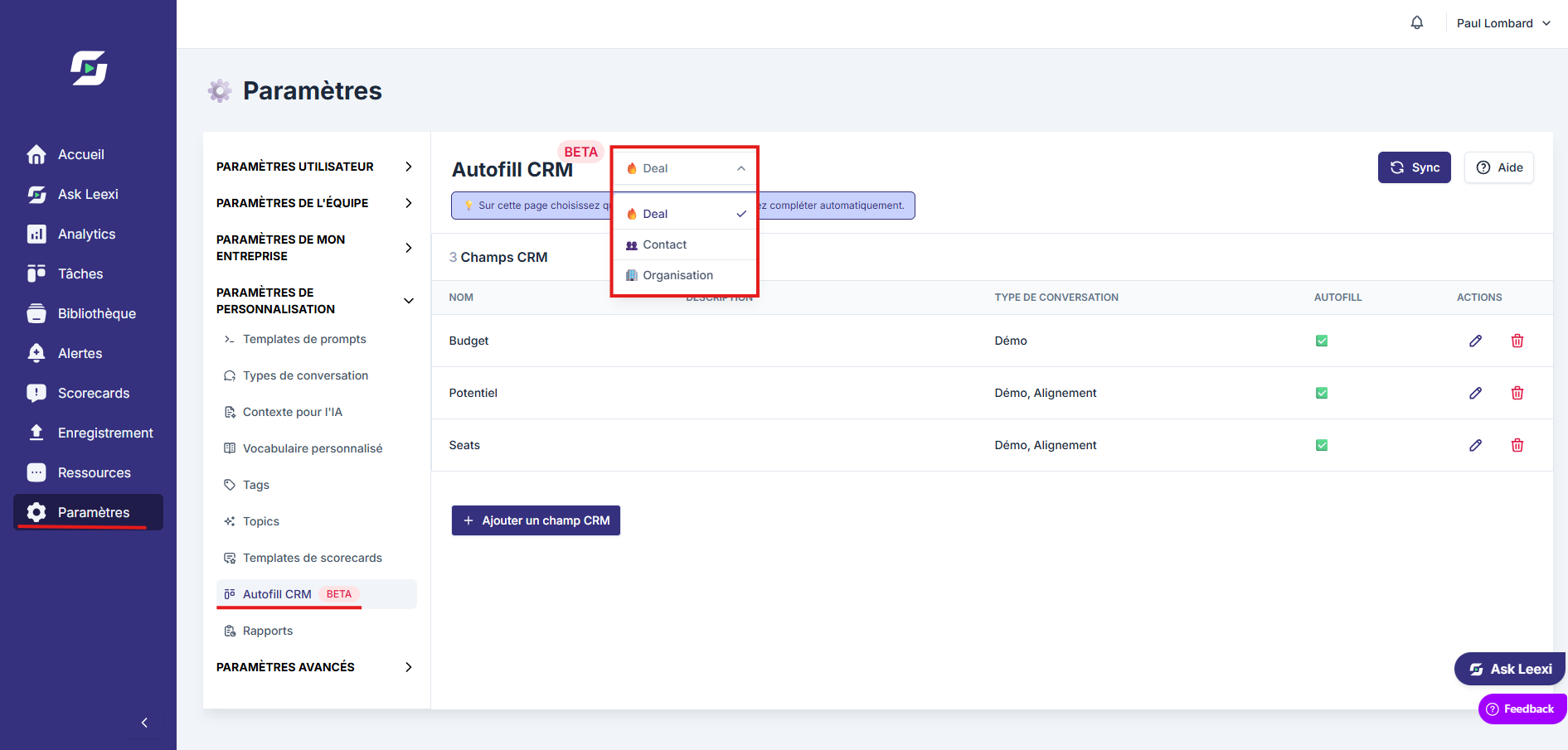
Go to Settings > Leexi Coach > Autofill CRM. The page only appears in the menu once a compatible CRM integration is enabled.
Choose which fields to populate
The selector at the top of the page switches between the Deal, Contact and Organization objects. Add the target fields for each object, then link them to the right business context. The Sync button reloads the list of available fields from the CRM.
Verify the result on real cases
Test autofill on a few calls before extending it to a larger scale.
Going further
- CRM Autofill integrations cover Salesforce, HubSpot, Pipedrive, Microsoft Dynamics, Zoho, and Odoo depending on your configuration.
- Leexi can complete up to 90 CRM fields (30 per category: Deal, Contact, Organization).
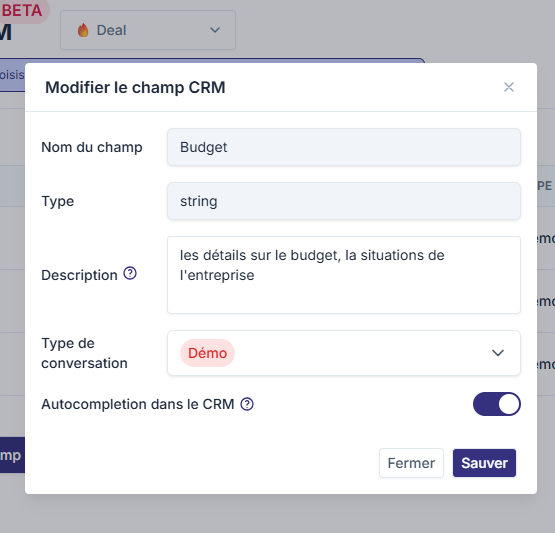
- Each field must be accompanied by a description telling Leexi what information to retrieve (example: for the "Budget" field, indicate "Details about the budget and the company's financial situation").
- Each field must be linked to one or more meeting types.
- Behavior depends heavily on the quality of field descriptions, meeting types, and selected fields.
- Autofill is more reliable when calls are well-qualified and CRM objects are clean.
- Autofill does not overwrite an existing value: if a field is already filled in the CRM, Leexi won't overwrite it.
Frequently asked questions
Yes. Without an active CRM integration, the setup page can't be used.
No. You should prioritize fields that are useful, stable, and truly fillable from a call.
Things to watch out for
- Avoid setting up too many fields at the start.
- Test each automation on real cases before generalizing. We recommend a one-week trial period to verify data is being properly collected.
- Poor field framing quickly creates noise in your CRM.
- Auto-completion cannot create new fields in the CRM: fields must already exist on the CRM side.
- Multi-select fields are filled on Salesforce, HubSpot, Pipedrive, Microsoft Dynamics and Zoho, but not on Odoo.
- Effectiveness depends on the quality of data exchanged during calls.