# CRM Autofill
> Automatically populate CRM fields from Leexi call content.
**Definition:** CRM Autofill automatically fills deal, contact, or organization fields based on information detected in calls and AI outputs.
**Feature video**
No video is available at this time.
- Teams who want to limit data re-entry in their CRM.
- RevOps or CRM administrators who structure update automation.
- Requires:
- Requires the **Leexi Coach** add-on and an active CRM integration.
- Configuration requires CRM field management rights.
- Available workflows also depend on the connected CRM.
#### How to use it
### Connect the CRM
First, activate the CRM connector appropriate for your organization.
### Open the Autofill configuration
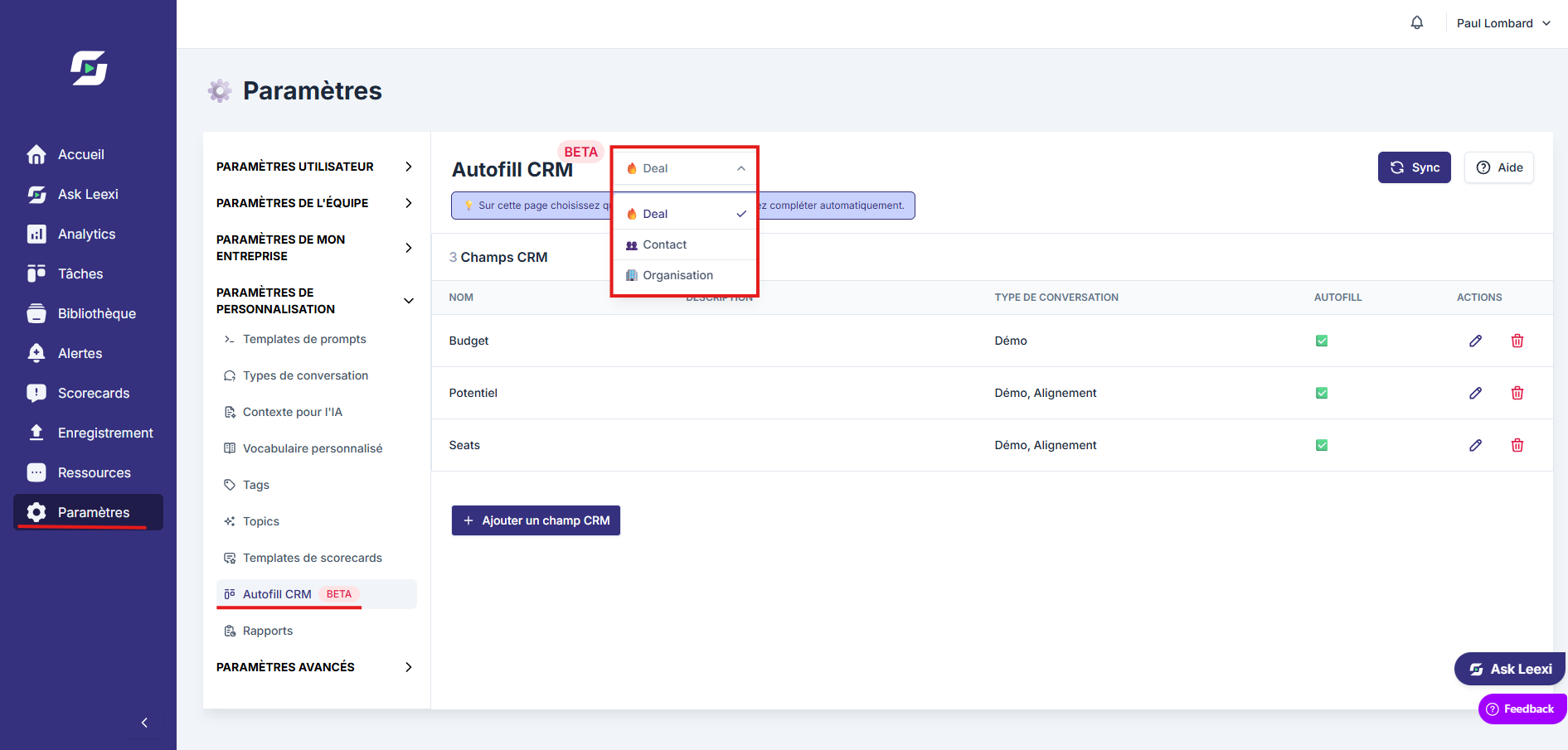
Go to `Settings > Leexi Coach > Autofill CRM`. The page only appears in the menu once a compatible CRM integration is enabled.
### Choose which fields to populate
The selector at the top of the page switches between the `Deal`, `Contact` and `Organization` objects. Add the target fields for each object, then link them to the right business context. The `Sync` button reloads the list of available fields from the CRM.
### Verify the result on real cases
Test autofill on a few calls before extending it to a larger scale.
## Going further
- CRM Autofill integrations cover Salesforce, HubSpot, Pipedrive, Microsoft Dynamics, Zoho, and Odoo depending on your configuration.
- Leexi can complete up to **90 CRM fields** (30 per category: Deal, Contact, Organization).
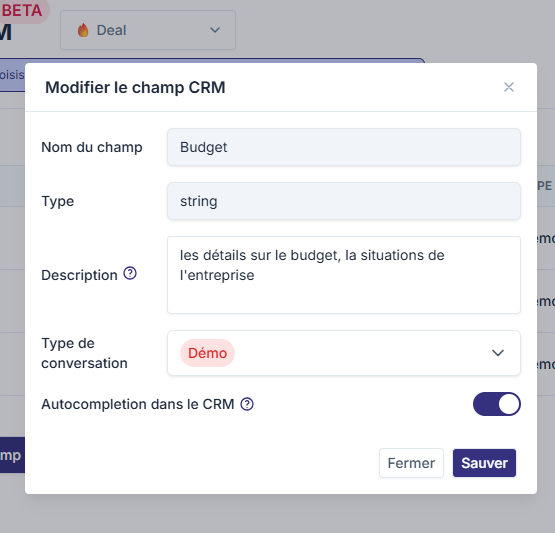
- Each field must be accompanied by a description telling Leexi what information to retrieve (example: for the "Budget" field, indicate "Details about the budget and the company's financial situation").
- Each field must be linked to one or more meeting types.
- Behavior depends heavily on the quality of field descriptions, meeting types, and selected fields.
- Autofill is more reliable when calls are well-qualified and CRM objects are clean.
- **Autofill does not overwrite an existing value**: if a field is already filled in the CRM, Leexi won't overwrite it.
## Frequently asked questions
Yes. Without an active CRM integration, the setup page can't be used.
No. You should prioritize fields that are useful, stable, and truly fillable from a call.
## Things to watch out for
- Avoid setting up too many fields at the start.
- Test each automation on real cases before generalizing. We recommend a one-week trial period to verify data is being properly collected.
- Poor field framing quickly creates noise in your CRM.
- Auto-completion cannot create new fields in the CRM: fields must already exist on the CRM side.
- Multi-select fields are filled on Salesforce, HubSpot, Pipedrive, Microsoft Dynamics and Zoho, but not on Odoo.
- Effectiveness depends on the quality of data exchanged during calls.
## Related articles
- [Meeting types](/en/guides/customization/conversation-types)
- [Integrations](/en/guides/general-settings/integrations)
## Previous and next pages